One image, precisely handled.
Choose a file, resize when needed, select JPG or PNG, and control the output quality.
- ✓Custom width & height
- ✓Automatic aspect ratio
- ✓JPG quality control
 PIXELIONEpic Image Converter & Resizer
The image utility that refuses to be boring
Convert, resize, batch-process, and bind images into PDFs—without paying a pixel.
Pick the job, choose the output, and let Pixelion keep the busy work out of your way.
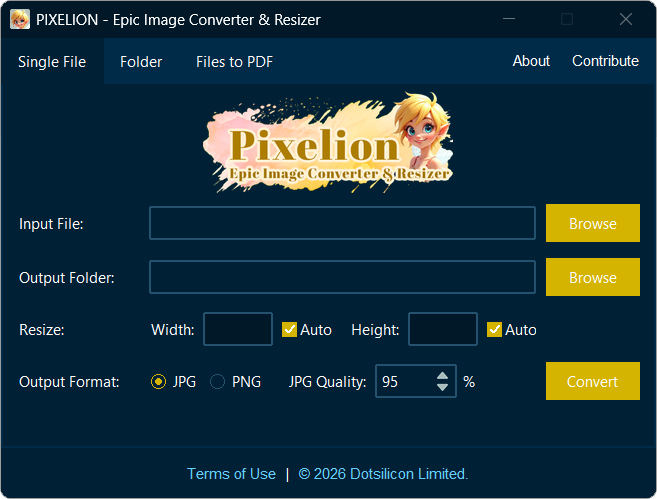
Choose a file, resize when needed, select JPG or PNG, and control the output quality.
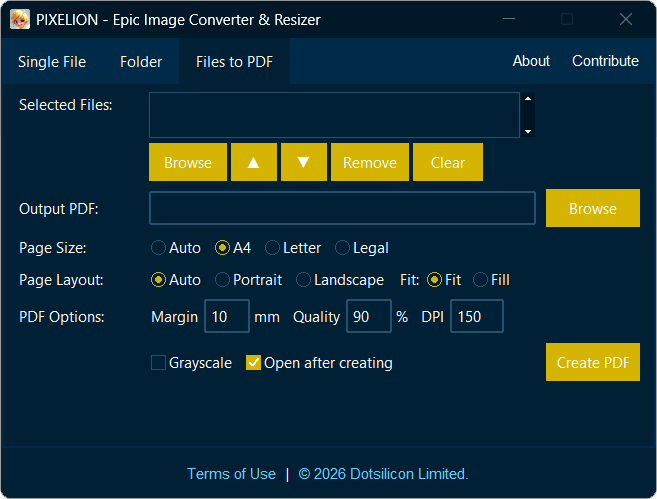
Collect individual images, set their order, choose how every page should fit, and create one shareable PDF.
From everyday web images to creative project files, Pixelion gives them a practical path forward.
Prepare, resize, and convert shoots for sharing or delivery.
Move creative assets between practical output formats.
Create lighter, correctly sized images for pages and campaigns.
Turn a confusing file into the format you actually need.
Every opinion is reviewed before it appears here.
“I ran a trial on the software. When set to 'Auto width height,' it resizes the picture correctly. However, when I set the size manually, it crops the image from the side.”
Your feedback will be reviewed before publication.
Working with images often requires converting files between different formats. Since I couldn’t find a quality image converter that met my needs, I created this software for myself. Built with care and passion, it is now available free for everyone. If it helps someone, my effort will have been worthwhile.
Download Pixelion 3.0 for Windows and start creating.